
I used to review my AI agent’s plans by typing in the terminal. I would ask, answer, and move on. No annotating, no markup.
Then my plan mode got better in two steps. First came a skill called grill-me. Now there’s Plannotator. This post is about both.
Step 1: Let the Agent Grill You
grill-me is a skill from Matt Pocock’s skills collection. You invoke it before a change, and the agent interviews you about your plan until every open question is answered.
It fixed something I didn’t notice before: the agent was guessing. Now it asks first. My plans improved a lot after I started using it.
But it all still happened in one place, the terminal. I answered in chat, and that was the whole review.
Step 2: Review the Plan as a Document
Plannotator opens the plan in your browser. You read it, comment on the parts you care about, and send everything back to the agent in one go. A hook is a small script that Claude Code runs automatically when something happens in a session. Plannotator’s hook waits for the agent to finish its plan, so the plan opens in your browser by itself. You don’t have to run any command.
At work, this made plan mode better than grill-me alone. The reason is simple. After I answer each plan or piece of code the agent gives me, I know exactly what the AI is doing. There’s no black box between my answer and its next step. That’s why I trust the results more now.
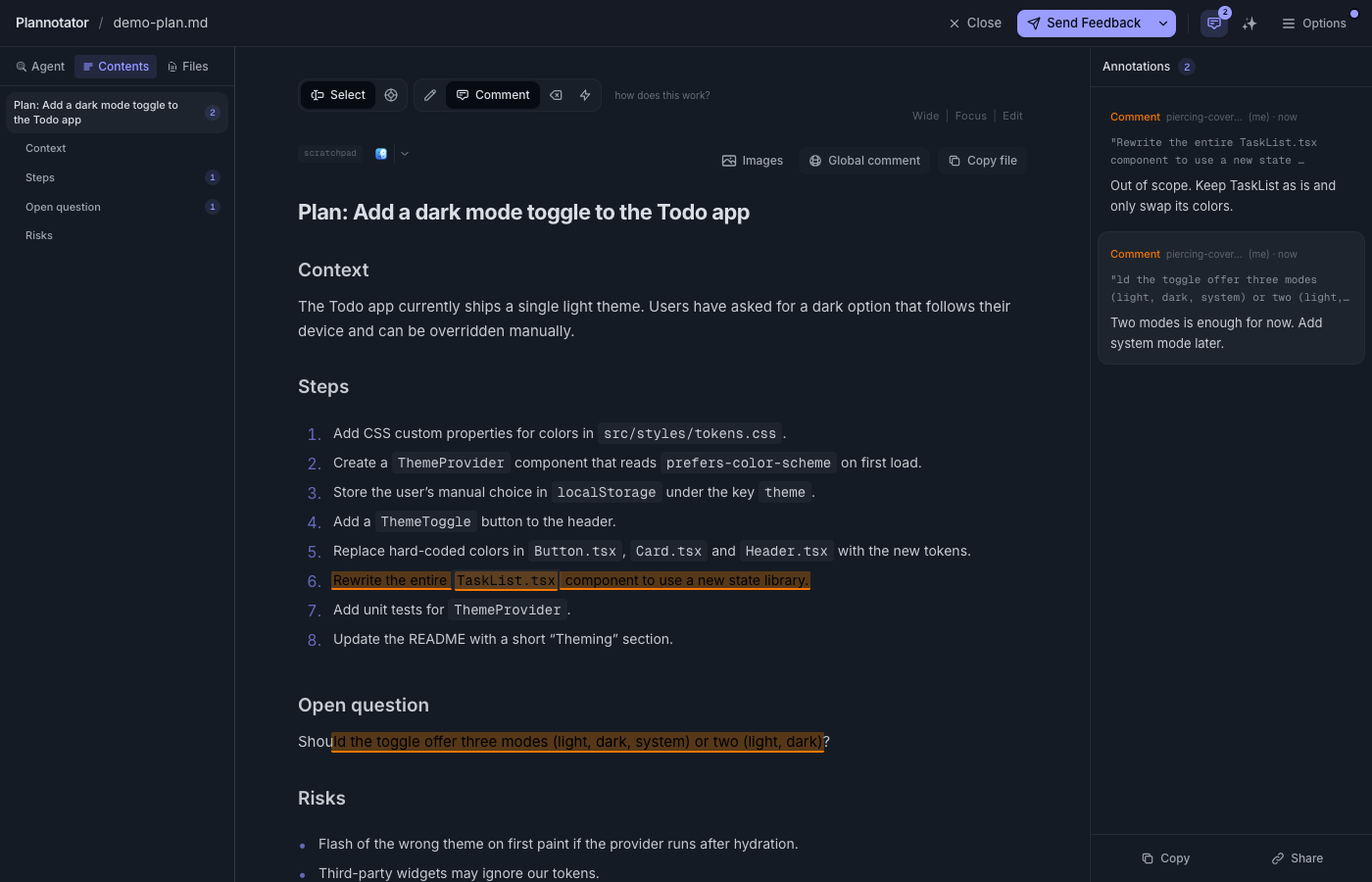
A demo plan with two comments. Each one is pinned to the exact text it’s about.
Here’s the whole loop in about fifteen seconds: select a line, leave a comment, and send it back.
What I Use
Five things, in order of how often I reach for them:
- Plan review. When the agent finishes planning in plan mode, the plan opens in the browser before any code is written. I read it, comment, and approve or send it back. This is the main one.
- Last message.
plannotator lastopens the agent’s latest answer so I can react to specific lines. - The Inbox. The agent leaves me a question and keeps working. I answer later.
- Pull request review. Give
plannotator reviewa GitHub or GitLab PR URL, and it opens the diff for comments. For a quick local diff, I use Hunk instead. Plannotator is for when I need a more serious review. - Ask about the code. I can ask questions about the codebase or file I’m reviewing.
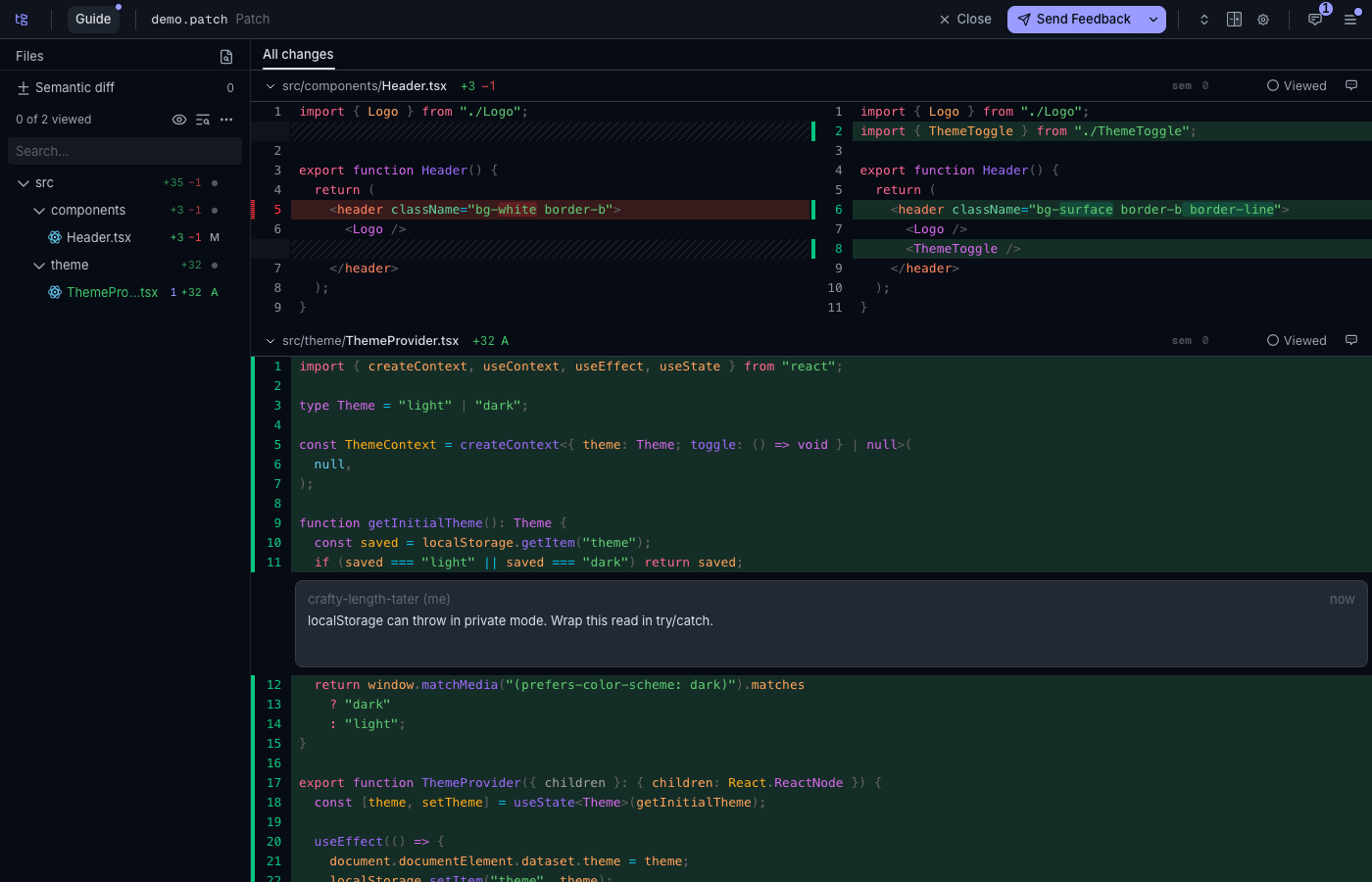
A demo diff with a comment on line 11, so the agent knows exactly where to look.
How to Get Started
Here’s the setup for Claude Code. It takes about five minutes.
1. Install the plannotator command
On macOS or Linux:
curl -fsSL https://plannotator.ai/install.sh | bashWindows has its own install scripts. You can find them in the repository.
2. Add the plugin
Inside Claude Code, run:
/plugin marketplace add backnotprop/plannotator/plugin install plannotator@plannotatorImportant: restart Claude Code after installing. The hooks only take effect after a restart.
3. Review your first plan
- Press
Shift+Tabto switch to plan mode, then ask for a small feature. - When the agent finishes planning, the review opens in your browser by itself.
- Select some text and leave a comment.
- Send your feedback, or approve the plan.
The agent revises the plan with your comments. Approve when you’re happy, and it starts writing code.
4. Try the slash commands
The install script also adds three commands you can type inside a session:
| Command | What it does |
|---|---|
/plannotator-last |
Annotate the agent’s last message |
/plannotator-annotate <file> |
Annotate a Markdown file, a URL, or a folder |
/plannotator-review [PR_URL] |
Review your current changes, or a pull request |
For a pull request, you need an authenticated gh (GitHub) or glab (GitLab) CLI.
One thing to note: a review waits until you approve, send feedback, or close the tab. Don’t start one right before you walk away.
Should You Try It?
If you use plan mode and keep typing corrections into the terminal, try Plannotator on your next plan. Leave just one comment and see how it feels.
If you only make tiny edits, skip it. A review costs time, and a one-line fix doesn’t need one.
I wrote before about balancing vibe coding and AI-assisted coding. My view is the same today: stay in the loop. Plannotator just makes staying in it less painful.
How do you review your AI agent’s work? I’d like to hear it.
Thank you for reading 👋